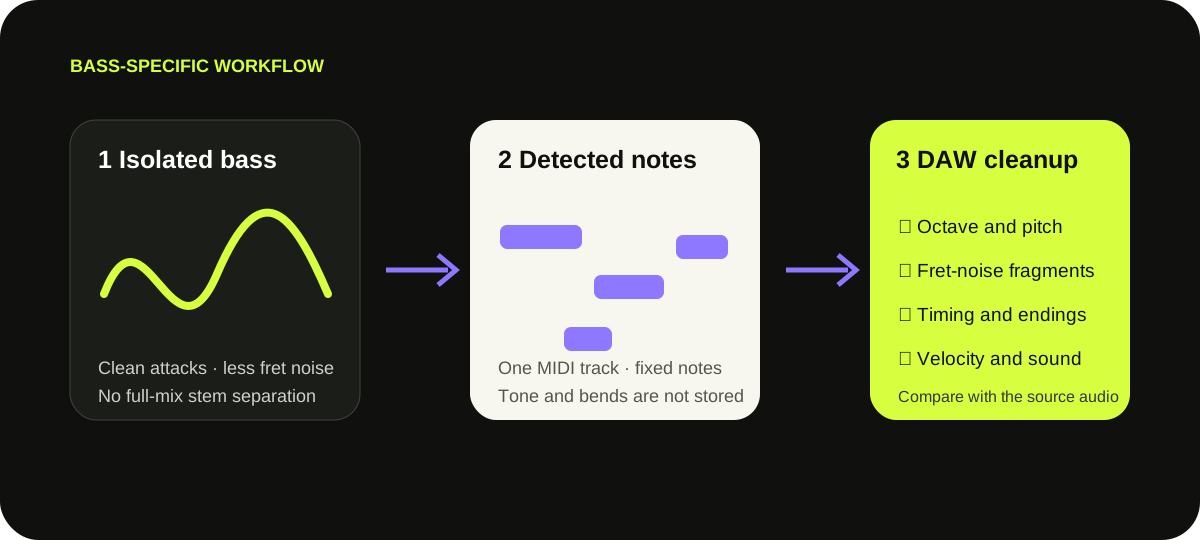
Upload an isolated bass take or bass stem—not a finished mix. The browser detects pitches and timing locally, then exports an editable .mid draft. It is file conversion, not a live pickup-to-MIDI system.
Use an isolated bass source, convert locally, then compare the MIDI against the recording. This does not extract bass from a full mix.
WHAT THE FILE CONTAINS
Notes and velocity—not bass tone, strings, or bends.
The browser down-mixes the file to mono, resamples it to 22,050 Hz, and turns detected events into one MIDI track. The download stores fixed note starts, endings, approximate velocity, tempo metadata, and a program change.
It does not preserve pickups, amp tone, pedals, fretboard position, string choice, or audio. Although upstream Basic Pitch supports pitch-bend data, this site's current writer does not include it. A slide can become stepped or neighboring notes.
Primary references: Spotify Basic Pitch source and this site's audited writer. Spotify recommends one instrument at a time and a DAW correction pass.
BASS-SPECIFIC CLEANUP ORDER
Check octave choices before polishing timing.
01
Pitch and octave
Compare suspicious low notes with the audio. Harmonics can make the wrong octave seem plausible.
02
Noise fragments
Delete short fret-noise notes or reconvert with a longer minimum-note setting.
03
Endings and timing
Trim overlaps by ear. Tempo metadata does not quantize the performance.
04
Assign a bass sound
Import the MIDI, choose an instrument, and adjust velocity against the source.
CONTROL → ARTIFACT
Reconvert when errors repeat.
A repeated problem is faster to address at the converter.
1
Too many harmonic notes Move sensitivity toward Clean, then compare.
2
Tiny attack fragments Move minimum note toward Long; this may remove intentional short notes.
3
Wrong octave Correct it in the DAW; this page has no bass-range filter.
4
Slide becomes steps Edit fixed notes or draw bend data in your DAW.
QUESTIONS, ANSWERED
Bass audio to MIDI FAQ
Can I convert a recorded bass line to MIDI?
Yes. Select an isolated bass recording or stem, convert it locally, and check octave, false short notes, timing, and releases.
Is this a live bass-to-MIDI pickup system?
No. It analyzes a selected file and does not turn a live pickup or microphone into real-time MIDI.
Can it isolate bass from a full song?
No. It analyzes the entire file and does not separate stems. Create a bass-only stem first.
Why can a bass note appear an octave too high?
Bass notes contain a fundamental and upper harmonics. Transcription can choose an octave matching those harmonics, so compare with the source.
Does it preserve slides, bends, or bass tone?
No. The download uses fixed notes and velocity, not continuous bends, amp sound, or audio.
Does MIDI identify the string and fret?
No. MIDI stores pitch, not fingering; tablature requires a separate interpretation step.