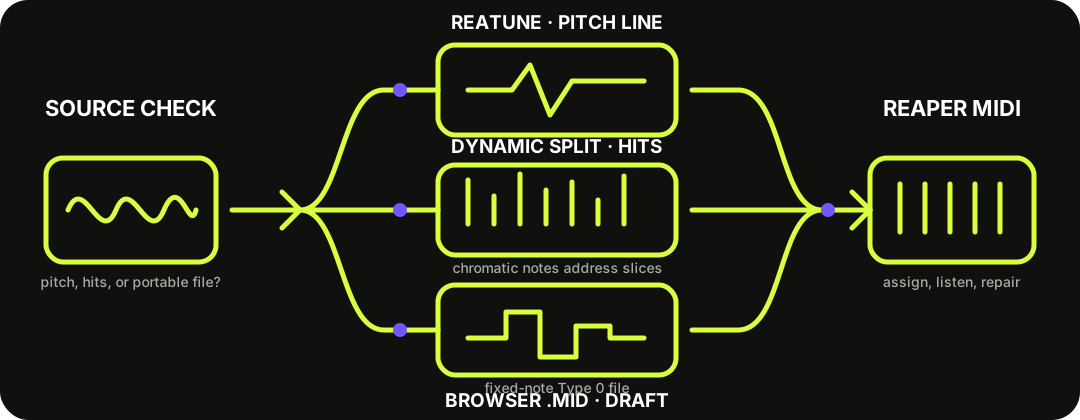
Use ReaTune for one clear pitched line, Dynamic Split for isolated drum transients, or this browser converter when you want a portable .mid before opening REAPER. These routes solve different problems; none turns a full mixed song into clean, separated MIDI tracks.
Choose by source first. Pitch tracking, transient triggering, and importing a note draft are different jobs.
THREE ROUTES, THREE JOBS
Do not send melody, drums, and a full mix through the same workflow.
ReaTune has a documented Send MIDI event when pitch changes option. It can drive a virtual instrument from a detected pitch line, so it fits an exposed vocal, bass, or lead better than chords or a dense arrangement.
Dynamic Split can create a chromatic MIDI item from detected slices. That is useful for timing and sample triggering from isolated hits; the ascending chromatic notes identify slices, not the musical pitches inside a drum recording.
Browser conversion makes a fixed-note Standard MIDI draft from one clear instrument before REAPER is open. It is the portable route, but it does not preserve the original sound or separate a full song into stems.
This download is already shaped for REAPER's simpler MIDI import case.
The site's current writer produces one Format 0 track on one MIDI channel at 480 ticks per quarter note. It contains a tempo meta event, one program change, and fixed note-on and note-off events with approximate velocity. REAPER 7.81 documents Type 0 as one track that can retain channel data and asks whether to place it as a multichannel item on one track or single-channel items on multiple tracks.
Because this file has one track and one note channel, splitting it across REAPER tracks adds no musical separation. Keep the single item unless you have deliberately edited the file to use several channels. Then choose the instrument and verify the project position and tempo by ear.
The Type 0 behavior comes from the REAPER User Guide 7.81; the exact file contents come from this site's current MIDI writer.
NATIVE CAPTURE
Record ReaTune's MIDI on a separate track.
ReaTune sends events while pitch changes. Routing those events to another track keeps the source audio intact and gives the captured item a clear destination.
1
Source track — insert ReaTune and enable Send MIDI event when pitch changes.
2
Receiving track — route MIDI from the source, arm the destination to record its output, and add a virtual instrument if you want to monitor it.
3
Capture once — play the phrase, record the events, then keep the audio and MIDI side by side.
4
Repair the item — remove vibrato-triggered fragments, fix boundaries, and compare every correction with the source.
DRUMS ARE A TIMING PROBLEM
Dynamic Split creates trigger notes, not a pitched transcription.
For isolated drum hits, open Dynamic Split, tune the transient and gate settings so the slices match the attacks you want, then choose Create chromatic MIDI item from slices. The result walks upward through MIDI notes so individual slices can trigger samples.
This is not the right route for a mixed drum bus when you need separate kick, snare, and hi-hat recognition. It also does not infer the musical pitch of each hit. Start from an isolated lane or separate the wanted drum first, then verify missed and double triggers.
Yes, for specific jobs. ReaTune can send a MIDI event when detected pitch changes, and Dynamic Split can create chromatic trigger notes from slices. Neither is a one-click full-song transcription and stem-separation system.
Should I use ReaTune or the browser converter?
Use ReaTune when you want live pitch-event output inside REAPER from one clear line. Use the browser converter when you want a portable fixed-note .mid that you can inspect before importing.
Can ReaTune convert chords?
Treat ReaTune as a one-pitch-line route. Its documented control sends an event as the detected pitch changes; it does not document polyphonic chord transcription.
Why did Dynamic Split create ascending notes?
The chromatic MIDI item assigns successive slices to successive notes for sample triggering. Those note numbers are slice addresses, not detected drum pitches.
Should I expand this browser file to several REAPER tracks?
Usually no. The current download is a one-track, one-channel Format 0 file, so expanding channels does not create stems or separate instruments.
Does the downloaded MIDI keep my original sound?
No. MIDI stores performance instructions, not recorded audio. Add a virtual instrument in REAPER and keep the source audio for comparison.