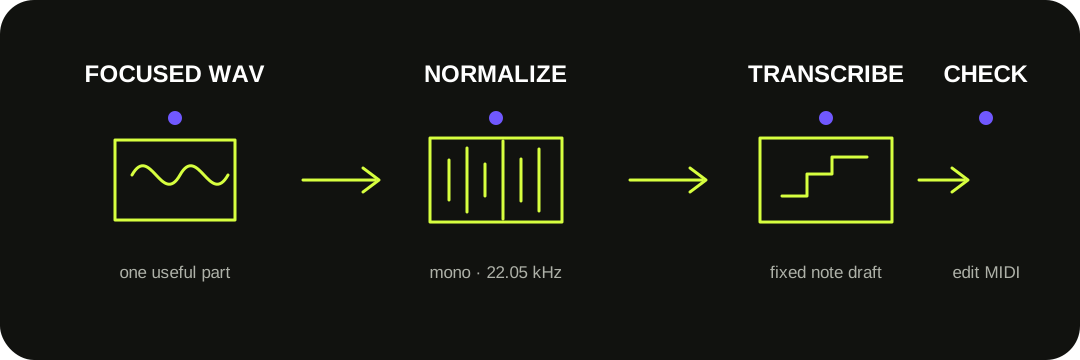
Upload the WAV directly and convert it locally into a MIDI note draft—no MP3 copy is required. The browser decodes the file, the converter mixes it to mono and resamples it for transcription, then you inspect and download one editable .mid track.
The WAV is source audio. The result is a new note file, not a smaller copy of the waveform.
THE DIRECT ROUTE
Keep the WAV. Skip the format detour.
Select a WAV your browser can decode, run the converter, and compare the detected notes with the recording. Turning that WAV into MP3 first adds an encoding step but does not help the model identify the intended melody, chord, or instrument.
Use the cleanest original you have. A dry solo instrument, vocal, or isolated stem gives the model a clearer target than a mastered mix with drums, effects, and several parts competing at once.
Primary references: Spotify's Basic Pitch TypeScript documentation defines the WAV-compatible browser input, mono down-mix and 22,050 Hz model rate; Microsoft's WAVEFORMATEX reference defines the channel, sample-rate and bit-depth fields.
WHAT THIS SITE ACTUALLY FEEDS THE MODEL
Container settings are normalized before note detection.
01
Decode WAV
The browser reads the complete file into audio samples. Unsupported WAV encodings fail here, before transcription.
02
Mix to mono
Stereo channels are combined because the current model analyzes one mono signal.
03
Resample
The implementation supplies 22,050 samples per second to the transcription model.
04
Write fixed notes
Detected pitch, onset, duration, and velocity become one Standard MIDI note track.
This is an implementation description, not a promise that every WAV codec will decode in every browser. The current MIDI writer does not export the model's pitch-bend contours.
A SAME-SIGNAL WAV CHECK
Doubling the sample rate and channels did not improve this fixture.
We generated the same 3.06-second C4–E4–G4 signal as two 16-bit PCM files: a 22,050 Hz mono WAV (134,990 bytes) and a 44,100 Hz stereo WAV (539,828 bytes). The stereo file duplicated the same samples into both channels; it did not contain extra musical information.
At the live converter's default controls (sensitivity 55, minimum note 10), both files produced 22 detected notes spanning B3 to G♯4. This is one controlled fixture, not a general accuracy rate. It shows why a larger WAV header setting or a duplicated second channel should not be treated as automatic transcription quality.
BEFORE YOU RE-EXPORT
Fix the source, not just the wrapper.
When a result is messy, change the musical evidence before chasing a different WAV setting.
1
Solo the target — export only the melody, bass, vocal, piano, or guitar part you want as notes.
2
Reduce overlap — trim count-ins, silence, room noise, delay tails, and unrelated sounds.
3
Convert once — inspect extra versus missing notes before moving either control.
4
Correct the MIDI — repair pitch and note boundaries before quantizing or choosing a new instrument.
WAV IS NOT THE OUTPUT
A waveform container and a MIDI file answer different questions.
A WAV header describes properties such as encoding, channel count, sample rate, and bits per sample. Microsoft documents PCM, floating-point, and several non-PCM format tags, so the .wav extension alone does not prove one exact encoding.
MIDI contains performance instructions rather than samples. This converter exports fixed note events with approximate velocity and timing. It does not preserve the recording's instrument tone, microphone character, room sound, lyrics, or waveform.
QUESTIONS, ANSWERED
WAV to MIDI FAQ
Can I convert WAV to MIDI online?
Yes. Choose a browser-decodable WAV on the converter, run the local transcription, and download the resulting Standard MIDI file. The audio stays in the browser during this workflow.
Should I convert the WAV to MP3 first?
No. Upload the WAV directly. An MP3 copy is an unnecessary intermediate step and does not restore or invent clearer notes.
Does 44.1 kHz stereo produce better MIDI than 22.05 kHz mono?
Not by itself. This implementation down-mixes channels and resamples to 22,050 Hz before inference. A stereo file can help only when its channels contain genuinely useful separation; duplicating one mono signal does not add evidence.
Why does the tool reject some WAV files?
WAV is a container that can carry different encodings. The browser must decode the stored audio format before the model can run. Re-exporting a standard PCM WAV can help when an unusual WAV codec is unsupported.
Can it turn a full-song WAV into separate MIDI tracks?
No. The current tool writes one note track from the whole input. Export or isolate the part you want before conversion.
Will the MIDI sound like the WAV?
No. MIDI stores note events, not recorded sound. Choose a virtual instrument after importing the file into a DAW.