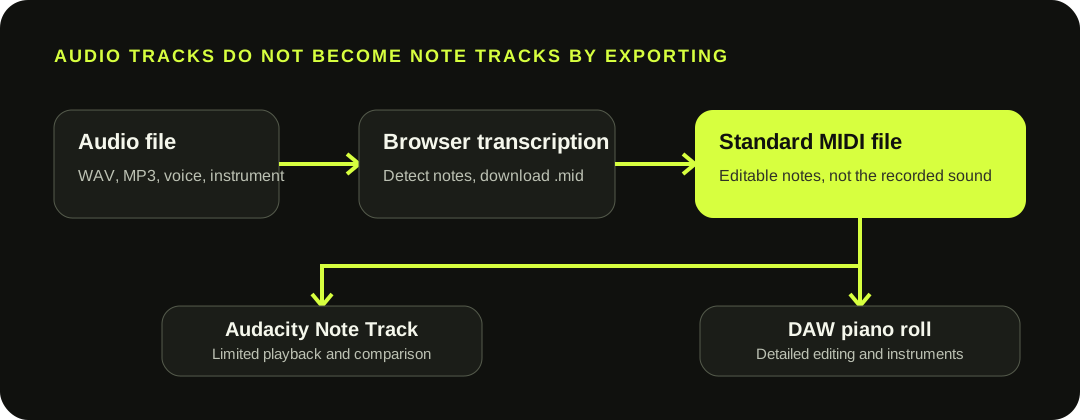
Audacity's Export MIDI command does not transcribe a waveform Audio Track. It exports a selected Note Track that already contains MIDI. To start from WAV, MP3, voice, or an instrument recording, create the MIDI externally, then use File > Import > MIDI in Audacity.
Transcription happens before Audacity. Import the resulting MIDI as a Note Track, or use a DAW when you need full piano-roll editing and instruments.
THE TRACK-TYPE BOUNDARY
Audio Tracks, Note Tracks, and projects are different objects.
Audio Track: contains a recorded or imported waveform. Audacity's documented audio export creates formats such as WAV, MP3, or OGG; it does not turn the waveform into note events.
Note Track: contains MIDI or Allegro data imported through File > Import > MIDI. Audacity can display and play that data, but its manual describes editing as limited to operations such as cut, paste, and delete.
Audacity project: an .aup3 file preserves project state. It is neither an audio export nor a MIDI file.
Create the note draft first, then import it into Audacity.
01
Use a clear source
Choose one exposed voice or instrument. A full mix is not separated into clean stems by this workflow.
02
Convert in the browser
Load the audio, review the detected notes, and download the .mid file.
03
Import MIDI
In Audacity, choose File > Import > MIDI. The file opens as a Note Track, not an Audio Track.
04
Pick the destination
Compare against audio in Audacity, or use a DAW for instruments, detailed note cleanup, and expressive MIDI editing.
Audacity's manual says Note Tracks are created by importing MIDI, not from the Add New Track menu.
WHY EXPORT MIDI IS DISABLED
The command needs a selected Note Track; a waveform is not eligible.
If only an Audio Track is selected, Export MIDI cannot act as a transcription command. The official manual defines the command as exporting the currently selected Note Track. Import or select a Note Track first.
Export scope also differs from an audio selection: Audacity exports one Note Track at a time and exports the entire Note Track regardless of a selection inside it. If the Note Track has been shifted to start after time zero, Audacity adds empty MIDI bars before its notes.
Use Audacity for comparison; use a DAW for detailed MIDI work.
Audacity's official FAQ says it lacks MIDI editing and virtual instruments traditionally found in DAWs. Its Note Track can still be useful beside the source waveform when you want to inspect alignment or perform limited cuts, pastes, and deletions.
1
Visual comparison — keep the Note Track aligned with the source audio in Audacity.
2
Limited trimming — use the documented basic Note Track edits.
3
Piano-roll cleanup — move the MIDI to a DAW for wrong notes, boundaries, and velocity.
4
Instrument sound — assign a virtual or hardware instrument outside this browser file.
WHAT THIS DOWNLOAD CONTAINS
The browser file is one fixed-note MIDI draft, not an Audacity project.
The current writer creates one Format 0 track at 480 ticks per quarter note. It includes a tempo event, one program change, fixed note-on and note-off events, and approximate velocity. It does not include the source waveform, stems, pitch-bend events, controller automation, or an .aup3 project.
Importing the file into Audacity creates a Note Track. It will not reconstruct the original voice or instrument sound. Keep the source audio for comparison, and use a DAW if the note draft needs detailed corrections or a virtual instrument.
QUESTIONS, ANSWERED
Audio to MIDI with Audacity FAQ
Can Audacity convert audio to MIDI?
Audacity's documented Export MIDI command does not analyze a waveform Audio Track. It exports an existing Note Track. Use an external transcription tool first, then import the MIDI into Audacity if a Note Track is useful.
Why is Export MIDI disabled in Audacity?
The command requires a selected Note Track. Selecting an Audio Track does not make the waveform eligible for MIDI export.
How do I import MIDI into Audacity?
Choose File > Import > MIDI and select the downloaded .mid file. Audacity creates a Note Track with limited editing.
Can Audacity export only the selected notes?
No. The manual says the entire selected Note Track is exported regardless of a selection inside it. Only one Note Track can be exported at a time.
Why does the MIDI contain empty bars at the start?
If an Audacity Note Track is shifted to begin after time zero, the export adds empty MIDI bars before the notes to preserve the offset.
Does MIDI keep the original recorded sound?
No. MIDI contains performance instructions rather than waveform audio. Assign an instrument in a compatible DAW or playback environment and keep the source recording for reference.
Is this an Audacity plug-in?
No. It is an independent browser converter. It creates a one-track Standard MIDI draft that can be imported into Audacity or another application.