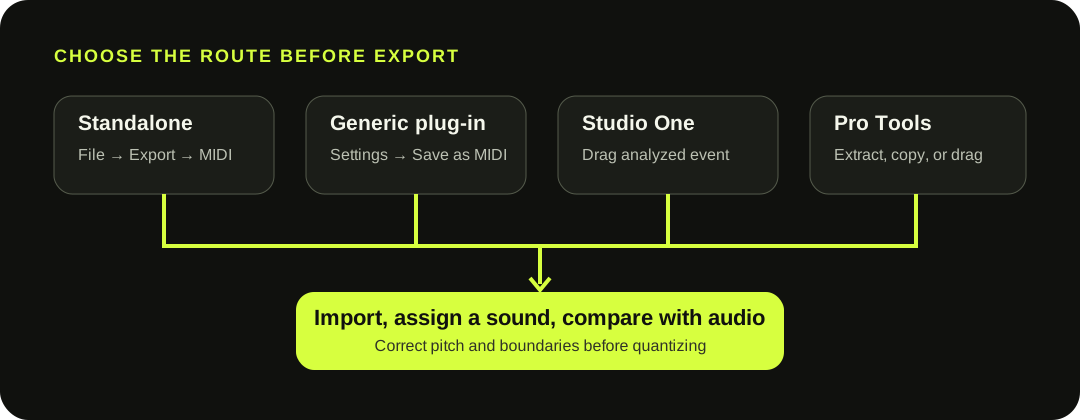
In standalone Melodyne, choose File > Export and select MIDI. In a generic plug-in host, use Settings > Save as MIDI. Studio One and Pro Tools use their own integrated actions. Check the route before exporting because scope, start-bar alignment, and available algorithms differ.
Use the route that matches where Melodyne is running. The exported notes still need an instrument and a comparison against the source audio.
THE ROUTE MATRIX
The menu and export scope depend on the Melodyne environment.
Standalone: choose File > Export, set the format to MIDI, choose the time range, and decide whether note tails should extend beyond that range.
Generic plug-in host: choose Settings > Save as MIDI. Celemony says this exports the entire Melodyne track rather than one transferred segment, and the file begins at the exact bar containing the first note.
Integrated hosts: Studio One can create MIDI by dragging from the top of an analyzed event to an Instrument Track. Pro Tools provides extract, copy, and drag actions. Those host routes are not the same as Melodyne's own export command.
The selected analysis changes what the MIDI notes mean.
01
Melodic material
Detected notes carry position, duration, pitch, and amplitude-derived velocity.
02
Vocal breaths
Celemony says breaths are omitted rather than converted into MIDI notes.
03
Rhythmic analysis
Events become notes at one common pitch while preserving timing, duration, and amplitude information.
04
Universal analysis
It follows the same same-pitch event behavior, so treat the result as a timing reference.
These rules come from Celemony's Audio-to-MIDI export documentation. A repeated pitch from Rhythmic or Universal analysis is documented behavior, not a drum-piece map.
THE BAR-ALIGNMENT TRAP
A generic plug-in export is track-wide and bar-aligned.
Suppose the first detected note starts halfway through bar 9. Celemony's generic plug-in guide says the exported file begins at the exact start of bar 9, not at bar 1 and not at the note's halfway point. Import the MIDI at bar 9 to keep the note aligned with its audio.
The same command covers the entire Melodyne track. If only one transferred segment is wanted, isolate or arrange the material before export rather than assuming the command follows a current segment selection.
EDITION AND HOST BOUNDARY
Do not treat host integration as proof that every edition has the same export command.
Celemony's current comparison lists Audio-to-MIDI export for assistant, editor, and studio, not essential. Separately, Celemony documents host-integrated Audio-to-MIDI workflows in Studio One and Pro Tools that can be available with essential. Check both the edition and the host route.
1
Essential — verify the host-specific action instead of assuming standalone export.
2
Assistant or editor — use the documented standalone or plug-in export route.
3
Studio — choose a common multichannel file or separate track files.
4
Polyphonic source — confirm that the installed edition exposes the required analysis.
MELODYNE STUDIO
Multitrack export adds choices that a one-track guide can miss.
Celemony documents two choices in Melodyne studio: one Standard MIDI file with a separate MIDI channel for each Melodyne track, or separate MIDI files for individual tracks. The separate-file route can also create a tempo-only file with the suffix .tempo.mid.
Choose based on the destination. A common file keeps the tracks together for one import; separate files make routing individual parts explicit. Treat the tempo file as a deliberate project-level import, not something to drop onto an instrument track by accident.
This site's converter creates a portable draft; it does not run Melodyne.
The current browser writer creates one Format 0 track at 480 ticks per quarter note. It includes a tempo event, one program change, fixed note-on and note-off events, and approximate velocity. It does not include source audio, stems, pitch-bend events, controller automation, multiple Melodyne tracks, or a separate tempo-map file.
Use it when you need a quick independent .mid file without a Melodyne installation. Use Melodyne when its analysis, editing, host integration, or studio multitrack options are part of the workflow. Neither route recovers the original instrument sound from MIDI.
QUESTIONS, ANSWERED
Audio to MIDI with Melodyne FAQ
Can Melodyne export audio as MIDI?
Yes. In standalone Melodyne, choose File > Export and select MIDI. In a generic plug-in host, use Settings > Save as MIDI. Studio One and Pro Tools also have documented host-integrated actions.
Does Melodyne essential export MIDI?
Celemony's current edition comparison lists Melodyne's own Audio-to-MIDI export for assistant, editor, and studio, not essential. Some hosts separately expose integrated Audio-to-MIDI actions with essential, so check the host-specific workflow.
Why did Melodyne export one repeated MIDI pitch?
Rhythmic or Universal analysis maps detected events to notes at the same pitch while retaining position, duration, and amplitude-derived velocity. Treat the result as triggers or a timing reference, not pitched drum transcription.
Why does the MIDI start before the first note?
In the generic plug-in workflow, the file begins at the start of the exact bar containing the first note. Import it at that bar start to preserve alignment.
Does the MIDI keep Melodyne edits?
It represents the interpreted notes at export time, not a Melodyne project. The MIDI cannot reopen Melodyne blobs, analysis settings, or audio. Keep the original project and audio if those edits matter.
Does the MIDI keep slides, tone, or the original sound?
No documented export here promises the original audio or continuous pitch curves. MIDI notes need a software or hardware instrument, and expressive slides may need manual pitch-bend editing in the destination.
Does this browser converter run Melodyne?
No. It is an independent local browser workflow that creates a one-track fixed-note MIDI draft. It does not preserve Melodyne edits or produce Melodyne studio's multitrack and tempo-file choices.