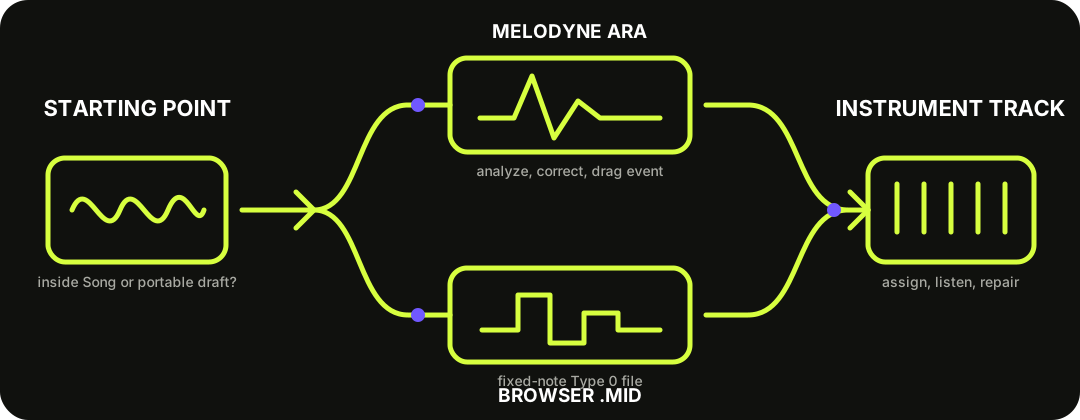
Use Melodyne ARA when the audio event is already inside Studio One: analyze it, then drag the event's top edge to an Instrument Track. Use this browser converter when you want a portable .mid first. Both routes create editable notes; neither separates a mixed song into clean instrument stems.
Choose by starting point. Melodyne converts an analyzed Studio One event; the browser route hands off a Standard MIDI file.
TWO ROUTES, ONE CHECKPOINT
The useful difference is where you want to inspect the audio analysis.
Melodyne ARA route: PreSonus documents opening an audio event with Audio > Edit With Melodyne. Celemony's Studio One guide says that after analysis you can drag from the top of that event to an Instrument Track. The MIDI mirrors Melodyne's interpreted note positions, lengths, pitches, and amplitude-derived velocities.
Browser route: convert one exposed vocal or instrument part before opening Studio One, audition the draft, and download a fixed-note Standard MIDI file. This route works independently of Melodyne, but it cannot preserve Melodyne edits or expressive pitch curves.
Analyze first, correct the interpretation, then make the MIDI event.
01
Open the event
Right-click the audio event and choose Audio > Edit With Melodyne. Let the analysis finish.
02
Check the algorithm
Use melodic material for a single exposed line. Rhythmic or Universal analysis exports timing differently, and polyphonic access depends on Melodyne's edition and algorithm.
03
Drag from the top
Create an Instrument Track, then drag the top of the Melodyne-analyzed audio event onto it. This is the Studio One ARA shortcut documented by Celemony.
04
Assign and compare
Load an instrument, keep the audio event beside the MIDI, and repair the notes before quantizing or deleting the source.
Celemony notes that vocals omit breaths on MIDI export, while rhythmic or Universal material creates same-pitch notes whose timing, length, and amplitude come from the detected events.
THE PORTABLE TYPE 0 HANDOFF
The browser file is one note draft, not a multitrack Song.
The current writer produces one Format 0 track on one MIDI note channel at 480 ticks per quarter note. It writes a tempo meta event, one program change, and fixed note-on and note-off events with approximate velocity. It does not write audio, stems, pitch bend, controller automation, markers, or a Studio One .song file.
PreSonus confirms that Studio One Pro 7 accepts MIDI files in an existing Song and that a Type 0 file does not expose individual tracks in the Browser. That matches this download: there is only one musical lane to place on an Instrument Track. Dragging it into Studio One does not create stems or recover the original instrument sound.
Do not promise chord extraction without checking the installed edition.
PreSonus documents installing and authorizing Melodyne separately. Celemony's current edition table gives individual polyphonic note access to editor and studio, while essential and assistant cover monophonic sources without DNA note editing.
1
Voice, bass, or lead — start with a clean monophonic recording and the Melodic algorithm.
2
Piano or guitar chords — verify that the installed edition exposes a polyphonic algorithm before expecting separate chord notes.
3
Drum loop — rhythmic export can preserve event timing and amplitude while assigning the same pitch to each note.
4
No Melodyne route — use the browser converter for a portable draft, then clean it in Studio One.
CHECK BEFORE QUANTIZE
Fix interpretation errors before timing polish.
First delete obvious false notes and restore missed notes. Next correct note starts and ends while listening against the audio. Then review velocity and instrument choice. Quantize last, because a grid can hide where the analysis actually split or joined notes incorrectly.
For the browser file, also confirm where the event landed and whether you want the file's tempo event to affect the project. For Melodyne, correct the detected blobs before dragging again if the first MIDI event reflects the wrong pitch or boundary.
QUESTIONS, ANSWERED
Audio to MIDI for Studio One FAQ
Can Studio One convert audio to MIDI?
Yes. Open an audio event with Melodyne, let it analyze the material, then drag from the top of the event to an Instrument Track. You can also import a Standard MIDI file made by this browser tool.
Do I need Melodyne?
Only for the integrated ARA route. The browser converter creates a portable .mid independently, which you can drag into an existing Studio One Song.
Can Melodyne turn piano or guitar chords into separate notes?
Polyphonic note access depends on the Melodyne edition and algorithm. Celemony's current comparison assigns DNA polyphonic editing to editor and studio, so check the installed edition before promising chord-note extraction.
Why did a drum conversion create one repeated pitch?
Celemony documents that rhythmic or Universal material can export notes with the same pitch while retaining detected positions, lengths, and amplitude-derived velocity. Use those notes as triggers, not pitched transcription.
Does the browser MIDI import as several Studio One tracks?
No. The current download is one track and one note channel in a Format 0 file. It contains no stems to separate.
Does MIDI keep the original sound?
No. MIDI stores performance instructions rather than audio. Assign an instrument in Studio One and keep the source recording for comparison.