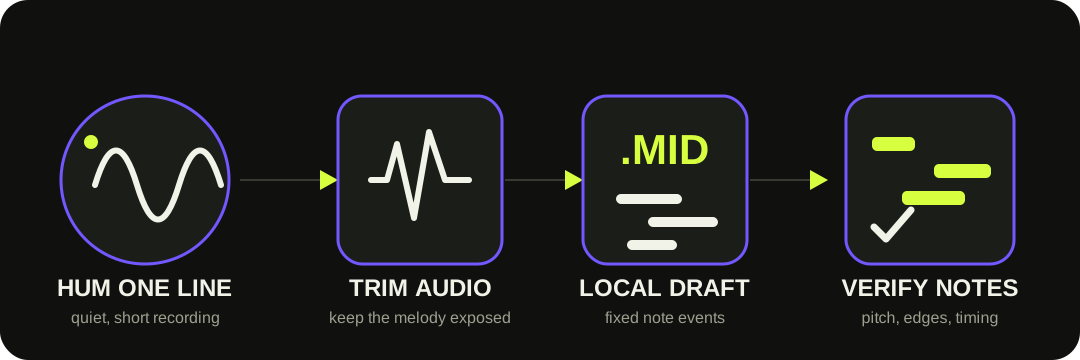
Record one clear hummed melody, upload the file, and convert it locally into a MIDI note draft. Listen against the original, adjust Note sensitivity or Minimum note if needed, then download the .mid and correct it in a piano roll.
Use the conversion as a draft. MIDI follows the pitches it detects, not the melody you meant to sing.
RECORD FIRST
This converter accepts a saved audio file, not a live microphone.
Record your idea with a phone, voice recorder, or DAW, then save or export the clip. The current site accepts WAV, MP3, OGG, and browser-supported FLAC. It mixes the recording to mono and resamples it locally before transcription.
Keep one melody exposed. Background music, another voice, finger taps, room echo, and spoken words all add pitch or onset evidence the model may turn into extra notes. Trim the file to the useful phrase before converting.
Primary reference: Spotify's Basic Pitch documentation explicitly describes humming a tune into a phone and turning the recording into MIDI for DAW editing.
ONE PASS, THEN A CONTROLLED RETRY
Let the mistake pattern tell you which control to move.
01
Convert at Balanced
Start with the default controls so you have a reference, not a guess about the fix.
02
Extra fragments?
Lower Note sensitivity or raise Minimum note, then reconvert.
03
Missing a real note?
Raise sensitivity or shorten the minimum note. Change one control at a time.
04
Compare and export
Choose the cleaner draft, download the .mid, and keep the audio beside it.
In Spotify's source, onset/frame thresholds determine accepted note evidence and the minimum-note setting filters short events. This page maps those mechanisms to the controls implemented by this site.
A TRACEABLE THREE-NOTE TEST
Stricter settings removed fragments, but did not make the draft perfect.
We generated a 3.06-second mono WAV with three target fundamentals—C4, E4, and G4—plus quieter harmonics, slight vibrato, and short fades to approximate a stable hummed vowel. It is a controlled signal, not a claim about the accuracy of real voices.
At the default settings (sensitivity 55, minimum note 10), the live tool returned 19 fixed notes spanning B3 to G♯4. A stricter pass (sensitivity 35, minimum note 20) returned 9 notes over the same displayed range. Ten short or weak detections disappeared, yet the intended three-note melody still required cleanup.
PIANO ROLL ORDER
Correct the melody before making it expressive.
A new synth sound can make a wrong transcription feel convincing. Keep the hum audible and repair meaning first.
1
Intended pitch — move notes that followed an out-of-tune hum or landed on a neighboring semitone.
2
Transition fragments — delete tiny notes created by slides, vibrato, breath, or consonant-like attacks.
3
Note boundaries — join one held note that was split, or separate two notes that merged.
4
Timing and velocity — quantize and shape dynamics only after the melody is correct.
WHAT THE FILE DOES NOT KNOW
MIDI captures detected events, not your intention or your voice.
The converter cannot know which scale, chord, lyric, or instrument you imagined. It exports one Standard MIDI track containing fixed note events with timing and velocity. The current writer does not preserve pitch-bend contours, so a slide or wide vibrato may appear as several neighboring notes.
It does not tune your performance to a key, invent harmony, retain vocal tone, separate multiple singers, create lyrics, or generate finished sheet music. Those are separate musical and production decisions.
QUESTIONS, ANSWERED
Hum to MIDI FAQ
Can I turn humming into MIDI?
Yes. Record one clear hummed melody, upload the file, and convert it into a Standard MIDI draft. Spotify documents voice and humming as Basic Pitch use cases, but the resulting notes should still be checked against the recording.
Do I need perfect pitch?
No. The model estimates the pitch you performed. It does not know the melody in your head, so correct any out-of-tune or neighboring notes in the piano roll.
Why did one hummed note become several MIDI notes?
Vibrato, slides, breath, room sound, and the transition between notes can create separate detections. Try lower Note sensitivity or a longer Minimum note, then remove remaining fragments manually.
Can I hum directly into this website?
Not currently. Record with a phone or audio app first, then upload the saved WAV, MP3, OGG, or browser-supported FLAC file.
Will it tune the melody or add chords?
No. The output follows detected pitches and creates one note track. It does not snap to a key, infer your intended notes, or generate harmony.
Does the MIDI keep the sound of my voice?
No. MIDI contains note events rather than recorded audio. Your DAW or MIDI player supplies the instrument sound.