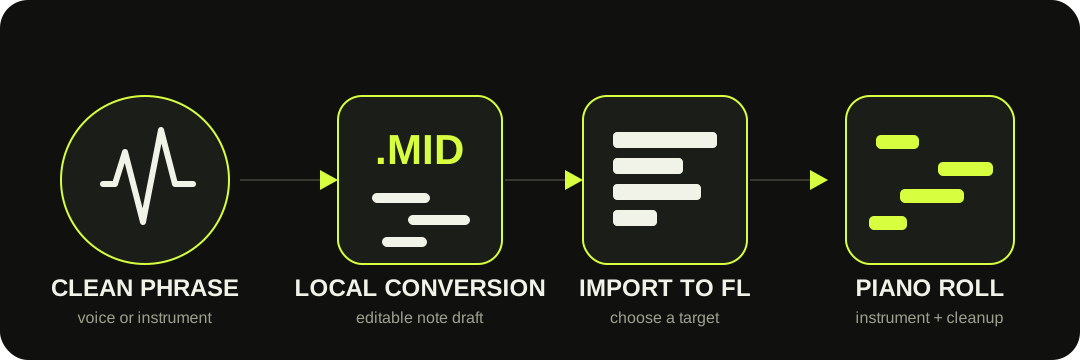
Convert one clear voice or instrument here, download the .mid file, then import it into FL Studio. Assign an instrument to hear the notes and use Piano roll to correct them. The file does not preserve the original sound or create an .flp project.
The transfer contains editable notes. FL Studio supplies the instrument sound and the detailed Piano roll editing.
CHOOSE THE RIGHT ROUTE
Use this site for a portable MIDI file. Use NewTone for FL Studio's native pitch-editing route.
This browser workflow is useful when you want a standard .mid file before opening a project. It works best on one exposed voice or instrument and gives you a note draft that can move between compatible music apps.
Image-Line documents a different native path in NewTone: analyze pitched audio, edit the detected pitch blocks, then use Send to piano roll or save the current detections as MIDI. That is the better route when you already work inside FL Studio and want to correct pitch detection before creating the Piano roll notes.
Export one clear voice or instrument. Short, dry phrases with distinct attacks are easier to review.
02
Download the MIDI
Use the converter, preview the detected notes, set tempo metadata and save the .mid file.
03
Import into FL Studio
Use File > Import > MIDI file, the Piano roll import command, or drag the file onto a supported target.
04
Load and correct
Choose an instrument for the channel, listen against the source and edit the note draft in Piano roll.
Image-Line documents .mid import from the File menu, Piano roll menu and drag-and-drop targets: Import MIDI Data Dialog.
IMPORT TARGETS
Where you drop the file changes what FL Studio asks next.
For a new or multi-track MIDI file, the main File-menu import gives the fullest import dialog. For one melody going to a chosen instrument, open that channel's Piano roll and import the file there. Dragging can be faster, but the destination—Channel Rack, Piano roll or FL Studio desktop—determines the available choices.
FL Studio's manual also distinguishes the filename extensions: its import dialog accepts .mid, not .midi. This site downloads .mid, so no rename or format conversion is needed.
FIRST PASS IN PIANO ROLL
Fix content before polish.
Correct the notes you can hear before applying global timing changes. That keeps a human phrase from becoming mechanically over-edited.
1
Wrong pitch or octave — compare the obvious mismatch with the source first.
2
Tiny fragments — remove short notes created by breath, reverb, bleed or string noise.
3
Starts and lengths — split merged attacks and trim overlaps before quantizing.
4
Timing and velocity — apply the smallest changes that make the part work in the arrangement.
WHAT THE FILE CONTAINS
MIDI notes are not the recorded sound.
The download stores detected pitch, start time, duration, velocity and tempo metadata. It does not contain the singer's voice, an instrument recording, room sound or effects. Assign a generator or plug-in instrument in FL Studio to turn the imported notes into sound.
The current site does not export an .flp project, split a mixed song into instrument stems, preserve lyrics, or write pitch-bend events. Treat important transcriptions as drafts and check every musical decision that matters.
QUESTIONS, ANSWERED
Audio to MIDI for FL Studio FAQ
Can FL Studio convert audio to MIDI by itself?
Yes. Image-Line documents that NewTone can send detected notes to Piano roll and save pitch detections as a MIDI file. This site is an alternative when you want a browser-made .mid file first.
Why is the imported MIDI silent?
MIDI is note and controller data, not recorded audio. Assign a software instrument or another MIDI destination to the channel that contains the imported notes.
Should I import from the File menu or Piano roll?
Use the main File-menu import when you want FL Studio's broader project, track and channel choices. Import from Piano roll when you want the notes placed into the currently selected instrument channel.
Does this create an FL Studio project?
No. The download is a standard .mid file. It does not include an .flp, instruments, mixer routing, source audio or stems.
Can it convert a full song into separate FL Studio tracks?
No. This tool does not separate a mix into vocals, bass, drums and other stems. Isolate the wanted part first, or use a purpose-built stem workflow before transcription.