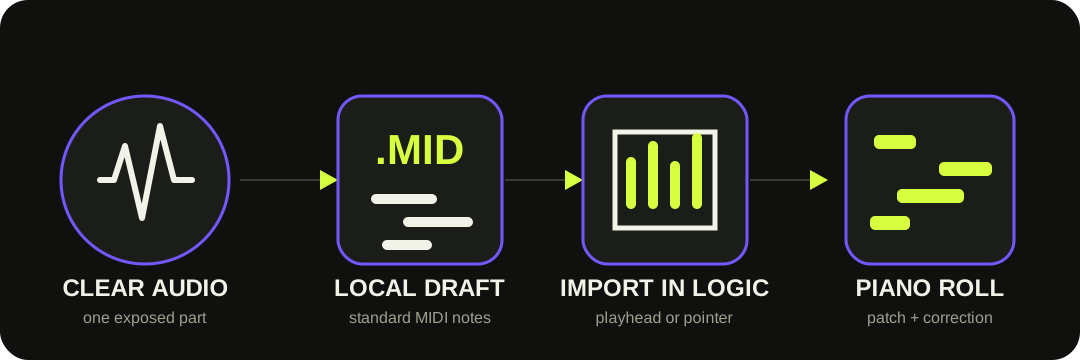
For one clear melody, use Logic Pro's Flex Pitch. For a portable note draft, convert here, download the .mid, then import it into Logic. Choose an instrument patch and correct the notes in Piano Roll. Neither route preserves the source sound in MIDI.
The MIDI file transfers notes and timing. Logic Pro supplies the instrument patch and the editing environment.
START WITH THE SOURCE
Flex Pitch and a browser-made MIDI file solve different versions of the job.
Apple's built-in route is designed around monophonic audio: one sung melody, bass line, whistle, or other single-note part. Flex Pitch lets you inspect and repair the pitch interpretation before choosing Edit > Create MIDI Track from Flex Pitch Data.
This site's route creates a Standard MIDI file before Logic Pro is involved. It is useful when you need a portable file, or when you want a first-pass note draft from a clear single-instrument recording. The underlying model can detect overlapping pitches, but dense chords, sustain and room sound still make the result harder to verify.
Use Import to add the notes to the current project.
File > Import > MIDI File places the file at the playhead, rounded to bars. Dragging a MIDI file from Finder or the All Files Browser uses the pointer position. Those choices add the note data to the project you are working in.
Opening a MIDI file is a different operation: Logic loads it as a new project and interprets its tracks, events, tempo changes and other stored data. For this site's one-track download, Import is normally the direct route when you want the notes inside an existing song.
PIANO ROLL REVIEW
Correct meaning before feel.
Fix what note was intended before smoothing how it was played. This prevents quantize or velocity edits from hiding transcription errors.
1
Pitch and octave — compare obvious wrong notes with the audio first.
2
Boundaries — split merged notes and remove fragments caused by breath, bleed or resonance.
3
Timing — move or quantize only after the note content is correct.
4
Velocity and patch — shape dynamics for the chosen instrument rather than copying the source timbre.
THE OUTPUT BOUNDARY
The download is one note track, not a Logic project.
This site's MIDI writer stores detected pitch, start, duration, velocity and tempo metadata in one track. It does not preserve the voice or instrument tone, effects, lyrics, Flex Pitch data, a Library patch, mixer routing or a Logic project.
It also does not separate a song into vocals, bass, drums and harmony, and it does not generate engraved notation. Logic's Score Editor can display imported MIDI, but readable notation still requires rhythm, key, voice and staff cleanup.
QUESTIONS, ANSWERED
Audio to MIDI for Logic Pro FAQ
Can Logic Pro convert audio to MIDI by itself?
Yes. With Flex Pitch active, Logic Pro can create MIDI regions from audio regions. Apple says this works best with monophonic material, and recommends correcting the pitch analysis before creating the MIDI track.
Can Flex Pitch convert chords?
Apple warns that chords and other polyphonic material may produce interpretation errors. This browser model can attempt overlapping pitches, but a chordal result is still a draft that needs note-by-note review.
Should I import or open the MIDI file?
Import it when you want the notes added to the current Logic project. Opening a Standard MIDI file starts a project based on the file and its stored MIDI data.
Why does the MIDI sound different from the audio?
MIDI contains note events, not the recorded timbre. The sound comes from the Logic instrument patch you assign after creating or importing the MIDI.
Does this browser tool create a Logic Pro project?
No. It downloads one Standard MIDI track. It does not create a Logic project, instrument patch, source-audio copy, separated stems or notation.