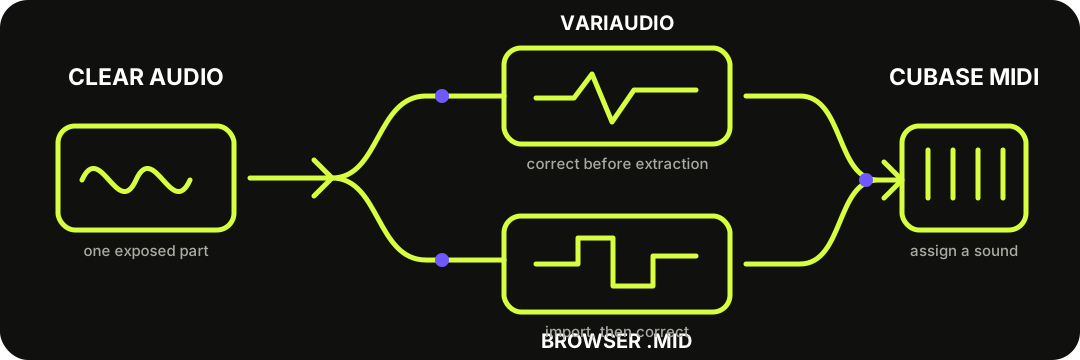
Use Cubase VariAudio when you want to correct pitch segments before extraction. Use this browser converter when you want a portable .mid first. Import the file, decide whether its tempo should affect the project, assign an instrument, and correct the note draft.
Both routes end in editable MIDI. The difference is where detection is corrected and which performance data the result can carry.
CHOOSE BEFORE YOU CONVERT
Native extraction and browser import are not the same handoff.
Steinberg's Cubase Pro 15 workflow starts with VariAudio segmentation in the Sample Editor. Correct the segments, pitch, and timing first; then use Functions > Extract MIDI. This route can include notes only, several kinds of pitch-bend data, or supported Note Expression data.
The browser route creates a portable Standard MIDI file before Cubase is open. It is useful for a quick draft from one clear voice or instrument, but the current writer stores fixed notes rather than the model's pitch-bend contours. Import it when portability matters more than preserving pitch curves.
Use an exposed vocal or instrument phrase. Trim unrelated sound, bleed, and long effect tails.
02
Download MIDI
Run the local converter, compare the detected notes with the source, and save the .mid.
03
Import safely
Choose File > Import > MIDI File, or drag the file from Explorer or Finder into the Project window.
04
Patch and correct
Assign an instrument, then repair pitch, boundaries, timing, and velocity while listening against the audio.
Steinberg documents both file-menu and drag-from-disk routes: Importing MIDI Files.
NATIVE DESTINATION MATTERS
New MIDI Track is the safest first VariAudio extraction.
Steinberg offers three destinations. New MIDI Track keeps the first extraction separate. Project Clipboard lets you paste at a chosen position. First Selected Track writes to the selected MIDI or instrument track—but Steinberg warns that MIDI parts from previous extractions on that track are deleted.
That makes New MIDI Track the cautious first pass. Compare it with the audio before moving or merging anything. Use the selected-track route only when replacing an earlier extraction is intentional.
This site's file contains a tempo meta event. Decide whether that event or the existing Cubase tempo map should control the imported notes.
1
Keep project tempo — enable Cubase's Ignore Master Track Events on Merge before importing into the current project.
2
Use file tempo — leave that option off when the converter tempo is meant to drive the merged project.
3
Check placement — confirm the imported part begins where intended before quantizing.
4
Correct notes first — fix wrong pitches and fragments before changing groove or velocity.
THE EXACT FILE CONTRACT
The download is one Format 0 note track, not a Cubase project.
The current writer stores one track at 480 ticks per quarter note with a tempo event, one program change, and note-on and note-off events carrying pitch, timing, duration, and approximate velocity. It does not write pitch bend, controller automation, markers, lyrics, audio, stems, VariAudio segments, or a .cpr project.
Cubase can import the file, but Cubase supplies the instrument, routing, editing, and project context. If pitch curves are essential, create them through VariAudio's documented pitch-extraction modes instead of expecting them in this download.
Cubase import choices are documented in MIDI Import Options; the file contents above come from the site's current MIDI writer.
QUESTIONS, ANSWERED
Audio to MIDI for Cubase FAQ
Can Cubase convert audio to MIDI by itself?
Yes. Cubase Pro and Artist 15 document a VariAudio workflow: correct the detected segments, pitch, and timing, then choose Functions and Extract MIDI. The available features can depend on the Cubase edition and version, so check the matching Steinberg help for your installation.
Should I use VariAudio or the browser converter?
Use VariAudio when you want Cubase's segmentation and pitch-curve controls before extraction. Use the browser converter when you want a portable fixed-note MIDI draft before opening Cubase.
Why did a previous extraction disappear from the selected track?
Steinberg says the First Selected Track destination deletes MIDI parts from previous extractions on that track. Use New MIDI Track for a safer first pass, or choose the selected-track route only when replacement is intentional.
Will importing the file change my project tempo?
The downloaded MIDI contains a tempo event. Cubase's Ignore Master Track Events on Merge option is the documented control for keeping the current project tempo when the file is merged into an open project.
Does this browser file include pitch bend or Note Expression?
No. The current file contains fixed note events, approximate velocity, tempo metadata, and a program change. Use Cubase's VariAudio extraction modes when pitch-bend or supported Note Expression data is required.
Can either route split a full song into separate MIDI tracks?
No. This site does not separate stems, and VariAudio extraction is not a full-song stem separator. Isolate the target vocal or instrument before transcription.